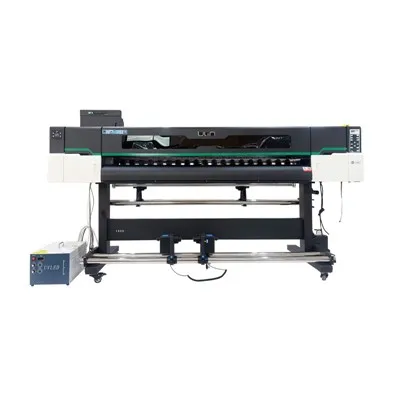
If you’ve ever walked past a vibrant, weather-resistant vinyl banner at a trade show, a seamless wallpaper print in a boutique hotel, or a custom decal on a delivery truck, chances are it came off a UV roll-to-roll printer. As a supplier of these machines, I talk to shop owners, sign makers, and custom fabricators every day who tell me they’re eyeing a UV roll-to-roll printer but get stuck on one question: what software do they actually need to make the machine work well, not just get it to print a blurry test page? It’s not just one program, and skipping the right tools can turn a $50,000 printer into a very expensive paperweight (or in this case, very expensive vinyl). Over the last 12 years of selling and supporting these printers, I’ve seen new operators make every mistake from trying to use a basic Microsoft Paint clone to skipping critical RIP software, so let’s break down exactly what software you need, why you need it, and how to pick the right tools for your shop. UV Roll To Roll Printer
First, let’s start with the non-negotiable core: Raster Image Processor (RIP) software. This is the backbone of every UV roll-to-roll printer, and if you don’t have it, your printer can’t function—full stop. Here’s why that matters: printers don’t understand JPEGs, PNGs, or the designs you make in Adobe Illustrator. They only understand tiny, precise dot commands that tell them exactly where to lay down UV ink, how much ink to use, and when to cure it. A RIP converts your design files into those commands, and it does way more than that. For UV printers specifically, a good RIP handles the unique requirements of roll-based printing: it manages roll length to avoid waste, adjusts for tension as the material feeds (something that basic printer drivers can’t do), and applies white ink properly—critical for printing on clear vinyl or dark substrates. If you skip a dedicated RIP and try to use the printer’s generic driver, you’ll end up with misaligned prints, inconsistent white ink coverage, and wasted material because you can’t tile designs across multiple rolls or nest jobs to fit more on one length of material.
Now, not all RIP software is created equal, and this is where most new operators go wrong. There are two main categories: entry-level RIPs that come bundled with most cheap UV roll-to-roll printers, and professional-grade RIPs that work with higher-end machines. The bundled ones seem like a steal at first, but they’re usually limited: they only work with that specific printer model, have no support for custom color profiles, and lack features like variable dot sizing (which makes prints look smoother) or ink savings modes that cut operating costs. For example, last year I worked with a sign shop in Phoenix that bought a discounted UV roll-to-roll printer bundled with a basic RIP. After three months, they were wasting 15% more white ink than necessary because the RIP couldn’t adjust dot size for small text on dark banners. They switched to a professional RIP and cut their ink costs by 12% within a month, plus they could now print custom interior decor for hotels that required precise color matching. The two most popular professional RIPs for UV roll-to-roll printing are Caldera and Wasatch SoftRIP, and both work with nearly every brand of printer we supply. Caldera is great for shops that do a lot of high-end graphics (like fine art reproductions or branded retail displays) because of its advanced color management tools, while Wasatch is more flexible for shops that do a mix of small decals, banners, and fabric prints, with a lower learning curve for new operators.
Next, you need design software, but not just any design software. Most people assume you need Adobe Creative Cloud, and while that’s true for many high-end projects, it depends on what you’re printing. Let’s be clear: Adobe Illustrator is non-negotiable for vector graphics, which are the foundation of sign making, decals, and large-format banners. Vector files don’t pixelate when scaled, so you can print a 10-foot banner from a file that was made for a 2-inch decal without losing quality. Adobe Photoshop is also important for editing photos, preparing raster files, and adjusting color balance before sending them to the RIP. But you don’t need the entire Creative Cloud suite for every job. For example, if a customer brings you a design from Canva or an Instagram post, you can edit and prepare it in Canva (which works great for simple social media graphics or small promotional items) before exporting it as a high-resolution PNG. For operators on a budget, there are free alternatives: Inkscape is a free, open-source vector tool that works almost as well as Illustrator for basic to medium-complex designs, and GIMP is a great free Photoshop alternative for photo editing. The key here is that your design software needs to export files in a format that the RIP can read—so keep that in mind when choosing a tool. I always advise new operators to start with design tools they’re already comfortable with, then upgrade as their business grows.
Now, here’s the software that most people forget, but that makes all the difference for UV roll-to-roll printing: color management software. UV ink is notorious for shifting color when it cures—when the UV light hits the ink, it dries and changes brightness and saturation by as much as 15% depending on the substrate (vinyl vs. fabric vs. wallpaper) and the ink type. Generic color settings from your printer won’t fix that, and that’s where a dedicated color management tool comes in. Color management software creates custom ICC profiles for each combination of ink, substrate, and printer. For example, if you’re printing white ink on clear PVC for a window decal, the profile will adjust the amount of colored ink to compensate for the clear material’s transparency, so the red in a logo looks identical on the decal as it did on the customer’s screen. We recommend pairing your professional RIP with color profiling tools like X-Rite i1Pro or Datacolor Spyder, which are easy to use even for someone who’s never done color profiling before. Last year, a boutique wallpaper manufacturer I work with was losing customers because their prints looked slightly different on paper than they did on site. They added a color profiling tool, created custom profiles for their 12 different substrate types, and customer complaints about color matching dropped to almost zero. Without this software, you’re essentially guessing at color, which is a death sentence for custom printing work.
There’s also a suite of supporting software that makes day-to-day operation of your UV roll-to-roll printer way easier, especially as your business grows. First, job management and estimating software. When you’re running 10 different jobs a day—small decals, a 50-foot banner, a custom roll of fabric for a restaurant—you need to track which jobs are in progress, how much ink they’re using, and how much to charge the customer. Tools like Jobber or Square for Retail are designed for small print shops, and they integrate with RIP software to pull exact ink usage estimates, so you never undercharge for a job. For larger shops or manufacturers, enterprise-level software like ERP for print can handle inventory tracking (so you never run out of UV ink mid-job), maintenance scheduling, and invoicing all in one place. Then there’s material management software. UV roll-to-roll printers work with hundreds of different substrates, from 2-inch vinyl rolls to 5-foot-wide fabric, and it’s easy to mix up material types mid-job. Some RIP software now has built-in material databases that store settings for tension, ink volume, and curing time for each material, so you just select the substrate from a dropdown and don’t have to adjust settings manually. That cuts down on setup time by 20% for most shops.
Wait a second—what about people who run very small operations, like a one-person shop that only does small decals? Can they skip any of this software? I get that question all the time, and the short answer is: you can cut corners, but you’ll pay for it later. Let’s say you’re a solo operator with a small UV roll-to-roll printer used for custom laptop decals. You might think you can use a free RIP and Canva, and maybe that works for a few simple jobs. But what happens when a local café asks you to print a 10-foot wall mural for their new location? Suddenly your free RIP can’t handle tiling the design across multiple rolls, your basic color profile makes the mural look dull when it cures, and you waste half the material because you couldn’t nest the design to fit the roll. For small operations, I recommend starting with a entry-level professional RIP (many of them have affordable monthly subscriptions, so you don’t have to pay thousands up front) and basic design software. It’s enough to handle most jobs, and you can add color profiling later when you take on higher-value work.
Now, let’s talk about common mistakes I see new operators make with this software stack. The biggest one is overbuying software. If you’re a one-person shop, there’s no reason to spend $10,000 on enterprise-level job management software when $50 a month for a small-shop tool will do. Another mistake is not updating software regularly. Printer manufacturers release software updates every few months that fix bugs, add support for new substrates, and improve color accuracy. Last year, we had a customer whose printer was leaving streaks in white ink for months, until they realized they hadn’t updated their RIP in six months—an update fixed the issue entirely. The third mistake is skipping training. All of this software has a learning curve, and even the best tool won’t help if you don’t know how to use it. Most RIP software companies offer free webinars, and as a supplier, we include on-site training for all our machines and software, because we know that a well-trained operator is more productive and makes fewer mistakes.

As a UV roll-to-roll printer supplier, my goal isn’t just to sell you a machine—it’s to set you up to make money with it. The software isn’t an afterthought; it’s the engine that turns a printer into a profitable business tool. You don’t need to buy every piece of software on the market, and you don’t need the fanciest tool for every job. You just need the right stack: a professional RIP that works with your printer and handles roll-specific printing, design software that fits your skill level, color management software to ensure consistent quality, and supporting tools to run your business smoothly. If you’re ready to invest in a UV roll-to-roll printer for your shop, and you want guidance on picking the right software for your specific needs, we’re here to help. Contact us to discuss your production goals, and we’ll walk you through the best tools to help you grow your business, reduce waste, and deliver high-quality prints every time.
Foil Printer References
- Caldera Group. "UV Roll-to-Roll Printing: The Importance of RIP Software." 2023.
- Wasatch SoftRIP. "Color Management Best Practices for Large-Format UV Printing." 2024.
- X-Rite Inc. "ICC Profiling for UV Curing Inks: Avoiding Color Shift in Roll Media Printing." 2023.
- Specialty Graphic Imaging Association (SGIA). "Small Business Guide to UV Printer Software Tools." 2024.
Hangzhou Yulan Technology Co., Ltd.
Hangzhou Yulan Technology Co., Ltd. is one of the most professional uv roll to roll printer manufacturers and suppliers in China. With abundant experience, we warmly welcome you to wholesale the newest uv roll to roll printer in stock here from our factory. Good service and quality products are available.
Address: Building, No.128 Rihui Road, Linping District, Hangzhou, China.
E-mail: ulinprint@gmail.com
WebSite: https://www.ulinprinter.com/
